


Side Stripe Sets
Installation Guide
Compatible Sets
Porsche 987.2 Spyder/Cayman R
Minimal Side Stripe Set
Invert Side Stripe Set
Heritage Side Stripe Set
Porsche 981 Spyder/GT4
Minimal Side Stripe Set
Invert Side Stripe Set
Heritage Side Stripe Set
Porsche 718 Spyder/GT4
Minimal Side Stripe Set
Invert Side Stripe Set
Heritage Side Stripe Set
Porsche 718 Spyder RS/GT4RS
Wordmark Side Stripe Set
Invert Side Stripe Set
Preparation
For a successful application, ensure the environment and surface are properly prepared. Give yourself plenty of room to work in.
Surface Cleaning
The vehicle surface must be perfectly clean before installation.
Ensure the target area is:
-
Clean and Dry: Free from moisture.
-
Smooth and Non-Porous to promote good decal adhesion.
-
Contaminant-Free: Completely free of oil, wax, ceramic coatings, grease or any other cleaning residues.
-
For newly painted vehicles, please allow at least 5 weeks for the paint to cure & outgas before applying any graphics
Recommended Tools
-
Application Squeegee (included)
-
Heat gun
-
masking tape
-
Scissors
Unpacking
-
Locate the ID number on the transfer tape of each graphic. Match these numbers to the installation instructions.
-
You may notice air bubbles between the graphic and the transfer tape. This is normal and does not affect the final application. Simply use a squeegee to gently push the bubbles toward the nearest edge.
Temperature
Humidity
Location
Between 15 °C and 25 °C
Work in low humidity
Indoors in a brightly lit area
Pack Contents
L1
Front Bumper Side Stripe - Left (passenger) side
L2
Door Side Stripe - Left (passenger) side
L3
Wing section Side Stripe - Left (passenger) side
R1
Front Bumper Side Stripe - Right (driver) side
R2
Door Side Stripe - Right (driver) side
R3
Wing section Side Stripe - Right (driver) side

Installation
⚠IMPORTANT - Please read carefully through this entire section before installing any graphics.
Material Layers
To ensure a perfect finish, our graphics are ‘sandwiched’ between two protective layers. The base release liner protects the adhesive until you are ready to apply, while the top transfer tape keeps the cast vinyl stable during installation. Please follow our guide to ensure you are removing the correct layer at the correct stage of the process.
Positioning and Alignment
Our graphics have been designed to take the guesswork out of placement onto the vehicle. We do this by perforation cutting our designs to key datum points featured on the original bodywork. These can be in the form of body creases, shut lines, trim edges or emblems. We also include outer tabs with peelable backings to help with provisional placement. In this section we’ll provide guidance on how to align each graphic with the existing bodywork.
L1 & R1 - Front Bumper Side Stripes (Fully complete one side at a time)
-
Gently detach the L1 & R1 graphics from the main sheet by following the perforated line.
-
Loosely place the graphics in each corner of the front bumper to familiarise yourself with the general placement and to confirm you have each side correctly identified.
-
Remove the release liner backing from the large and small outer tabs


-
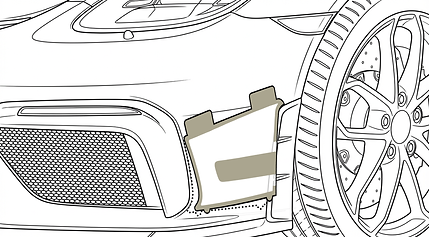
Using the outer tabs, tack the graphic onto the bumper. Use the images below for guidance on alignment.
for 987.2
for 981


for 718
for 718 RS

⚠ ASSESS - Check over the positioning to ensure good alignment with the relevant bumper features.
Tune placement with the outer tabs if needed. Firmly secure the tabs once you are satisfied with placement.
-
With the outer tabs acting as hinges, Lift the graphic up and back on itself to gain access to the release liner. Make sure the outer tabs remain attached to the bumper to prevent misalignment

-
Peel the release liner away from the graphic
-
unfold the graphic to its original position, but do not let it touch the bodywork.

-
Using the supplied application squeegee, gently bond the graphic to the bumper. Work in overlapping horizontal strokes, starting from the outer tabs and working outwards
⚠Maintain Tension - Keep the graphic taut and slightly elevated with your free hand, letting the squeegee pull the vinyl down onto the surface.
L2,L3 & R2,R3 - Door and Wing Side Stripes (Fully complete one side at a time)
-
Gently detach the remaining graphics from the main sheet by following the perforated line. Keep the wing and door elements of the graphic attached to one another (L2+L3, R2+R3).
-
Loosely place the graphics onto the bodyside to familiarise yourself with the general placement and to confirm you have each side correctly identified.
-
Remove the release liner backing from the small & large outer tabs
-
Using the outer tabs, tack the graphic onto the door & wing. Focus on aligning the graphic to the front bottom corner of the door, and work your way outwards. Check all edges of the graphic align with the edge of the door and wing.

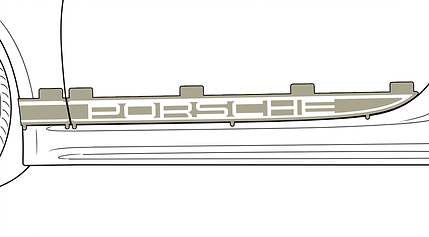

⚠ ASSESS - Check over the positioning to ensure good alignment with the relevant shutlines and body features.
Tune placement with the outer tabs if needed. Firmly secure the tabs once you are satisfied with placement.
-
Separate the door and wing pieces of the graphic by running the edge of the application squeegee along the door shutline perforation.

-
With the outer tabs acting as hinges, Lift the door section of the graphic (L2 or R2) up and back on itself to gain access to the release liner. Make sure the large outer tabs remain attached to the door to prevent misalignment.

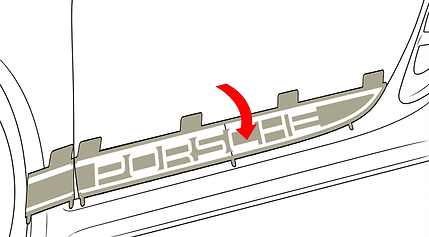
-
Peel the most rearward half of the release liner away from the graphic.
-
unfold the graphic to its original position but but do not let it touch the bodywork.

-
Using the supplied application squeegee, gently bond the graphic to the door. Work in overlapping vertical strokes, starting from the outer tabs, working outwards.
⚠Maintain Tension - Keep the graphic taut and slightly elevated with your free hand, letting the squeegee pull the vinyl down onto the surface.

-
With the rear portion in place, lift the first half of the graphic away from the door and remove the remaining release liner.

-
With your free hand, use the application squeegee to attach the remaining half the graphic to the door. Work from the centre of the graphic towards the front end of the door

-
With the outer tabs acting as hinges, Lift the wing section of the graphic (L3 or R3) up and back on itself to gain access to the release liner. Make sure the outer tabs remain attached to the wing to prevent misalignment.
-
Peel the release liner away from the graphic
-
unfold the graphic to its original position, but do not let it touch the bodywork.


-
Using the supplied application squeegee, gently bond the graphic to the wing. Work in overlapping vertical strokes, starting from the door shutline, working towards the wheel arch liner.
⚠Maintain Tension - Keep the graphic taut and slightly elevated with your free hand, letting the squeegee pull the vinyl down onto the surface.

Finishing up
-
Carefully peel and discard of the top transfer tape. For best results, pull the tape back slowly at a sharp 180° angle.
⚠ Troubleshooting - If any part of the graphic starts to lift with the transfer tape, stop, lay it back down, and reapply more pressure with the squeegee.

-
With the transfer tape removed, if you notice any bubbles in the graphic, apply gentle heat and use the the application squeegee to work them out to the closest edge.

-
On the door shutline and wheel arch edges, use a heat gun and your squeegee to carefully tuck and set the vinyl in position. Heat is important for “setting” the vinyl’s memory to its new shape, ensuring it will stay firmly in place without risk of peeling.

-
To ensure a permanent, long-lasting bond, we recommend post-heating the entire graphic. Evenly heat the surface of the vinyl to 90°C. This process ‘sets’ the adhesive and the vinyl, preventing any lifting or shrinking over time.